
Band-in-a-Box® 2024 Videos

less than 8 minutes!
Band-in-a-Box® 2024
New Features
There are over 50 new features in Band-in-a-Box® 2024!
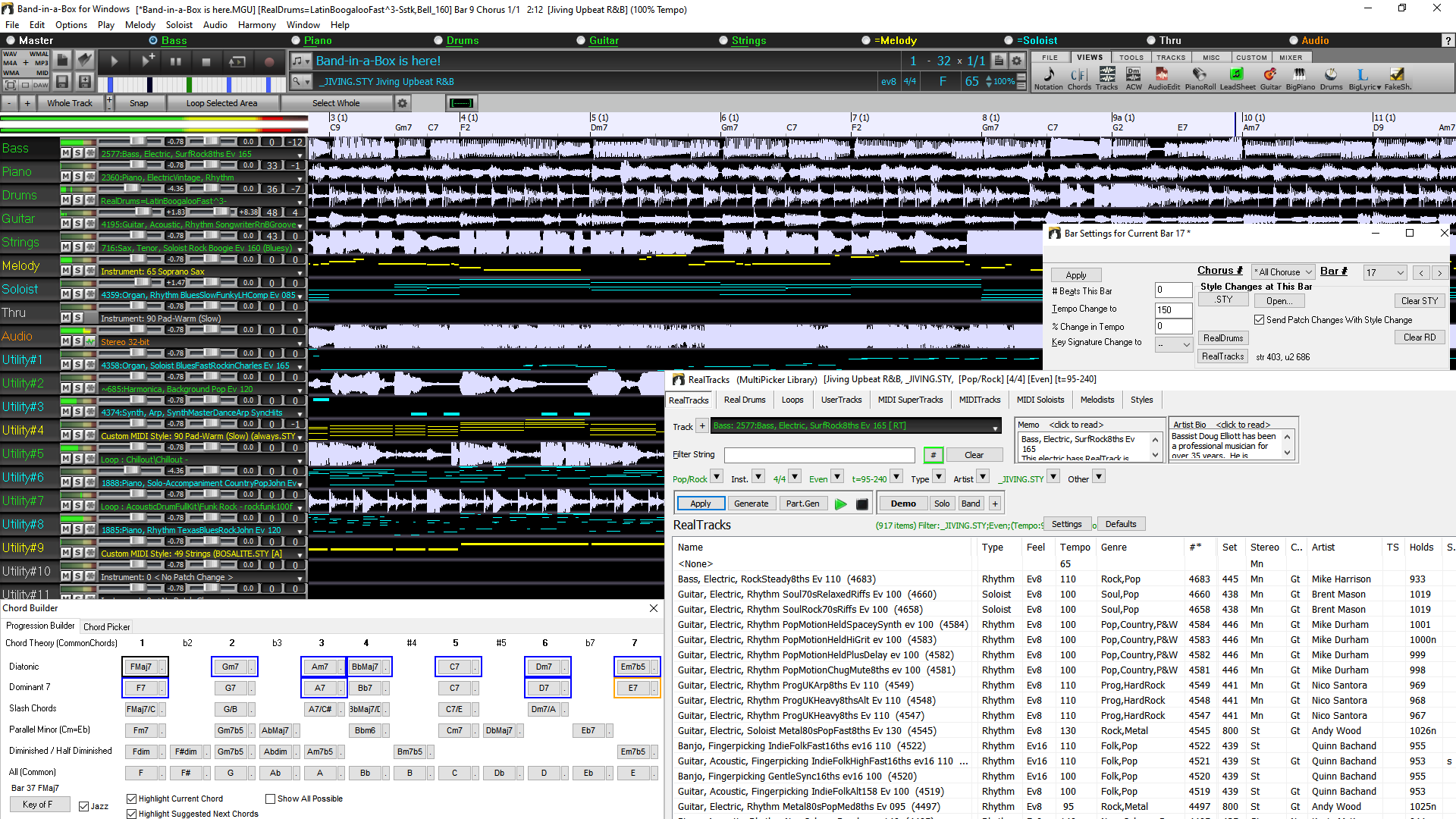
These include Many Major New Features. First, there is a new Tracks Window. Similar to most DAW tracks windows, this shows all the tracks, allowing lossless data manipulation of tracks in an environment familiar to DAW users. The new Tracks window includes specific support for creating loops and phrases using content from RealTracks. There are now Floating Windows Everywhere! Twelve legacy modal dialogs have been redone as non-modal floating windows so they can be used interactively with other functions. These include new floating windows for styles, RealTracks, RealDrums, loops, UserTracks, MIDI SuperTracks, Custom MIDI Tracks, MIDI Soloists, Melodists, F5 Bar Settings, Track Settings and Chord Options. Major GUI Enhancements include a tabbed MultiPicker Library window. This is a one-stop shop to pick tracks from any of the 8 track types. All pickers show a common interface with a similar look and functions for filters, search, selection, audition, and generation. Partial Track Generation for Every Track Type is added. Bar Settings (F5) and rests/shots/holds/pushes can be made for all 24 tracks. The new Chord Progression Builder allows you to interactively create your own progression by showing you the Best Next Chords at any point. There are over 800 Custom MIDI Tracks (with demos) that users can add as single MIDI tracks that follow the chords. The Playback Engine speed has been enhanced and uses multiple CPU Cores to speed generation and renders. There are Melodist & Soloist enhancements, support for reading LyricLab AI created lyric/chord files, Set Favorites for any track type, new Data filters for tracks, and more!
Band-in-a-Box® 2024 DAW Plugin
The Band-in-a-Box® VST DAW Plugin has over 20 new features including near instant playback direct from disk, to audition various styles without creating WAV files. For Reaper DAW users, the Plugin has added built-in specific support for the Reaper DAW API allowing direct transfer of Band-in-a-Box files to/from Reaper tracks, including tiny lossless files of instructions which play audio instantly from disk. You can now load chords from MIDI files. There's support for Shots/Rest/Holds on Utility tracks, and more!
RealBand 2024
There are over 30 new features to RealBand 2024, including 256 available tracks, 32 VSTi/DXi synth instances, modern color scheme for some windows, Playable RealDrums support, new arrow buttons to change the current time, chord symbols to display in the Track window, 48 tracks to display in the Mixer, the ability to hide any extra masters or auxes in the Mixer, improved handling of VU levels in the Track window, better VU levels display when recording to mono tracks, song preview in the StylePicker, the ability to initiate track generation from the StylePicker, and much more!
And of course, the Band-in-a-Box® program, DAW Plugin, and RealBand can all use the new RealTracks, RealDrums, MIDI and style content.
Band-in-a-Box® 2024 for Windows® is here!
We've been busy and added over 50 new features and an amazing collection of new content, including 222 RealTracks, new RealStyles, MIDI SuperTracks, Instrumental Studies, "Songs with Vocals" Artist Performance Sets, Playable RealTracks Set 3, Playable RealDrums Set 2, two new sets of "RealDrums Stems," XPro Styles PAK 6, Xtra Styles PAK 17, and more!
We have a 2024 49-PAK with 50 BONUS RealTracks in addition to the 222 new RealTracks, so in total an amazing 272 new RealTracks and RealDrums are available! There are over 100 new "Playable RealTracks" Hi-Q sounds, which match many of our RealTracks, so you can easily switch from RealTracks parts to MIDI notes while maintaining the instrument sound! There is also a set of 10 new Playable RealDrums, and ALL Playable RealTracks and RealDrums also have accompanying audio demos. The 2024 49-PAK also includes 2 new Artist Performance Sets that contains 50 original songs with vocal performances by a variety of talented singers! There are Instrumental Studies Sets that include exciting '80s hard rock rhythm & soloing guitar, as well as a cool new set of New Orleans piano studies. There are also two new RealDrums Stems Sets, which allow you to access the individual wave files from each different mic used to record many of our most popular RealDrums! There are three new MIDI SuperTracks Sets, including styles designed to work with the amazing SynthMaster plugin!
In addition, there are over 100 new RealStyles that use the new RealTracks. These include new requested '60s Soul Jazz with legendary drummer Mike Clark. There are also new modern jazz & fusion styles. There are funk and R&B horn section styles, which not only include the ensemble tracks, but ALSO include the individual stems, so the horns can be on separate tracks, but playing perfectly in sync with one another. There are LA Jazz Pop styles with guitars, bass, and keyboard, that blend beautifully with our previously released LA Jazz Pop RealDrums. There are requested fast bebop comping piano styles, as well as new 2-hand piano soloing styles. There are exciting New Orleans piano styles with pianist-extraordinaire Kevin McKendree. And we also have requested world styles, with existing new Chinese instruments (Guzheng, Dizi, Pipa), as well as instruments with South American origins ("Siku" panpipes & bongos). In the "pop, rock, and world" category, we've added many "southern keys,", including organ styles from Charles Treadway and more great electric and acoustic pianos from Kevin McKendree, including great funky clav styles. We've added to our requested "southern soul" RealTracks with new guitars from Nashville great Brent Mason and veteran pro Pat Bergeson. There are new "indie-folk" guitars and banjos, and more. And on the Country & Americana side, there are great new modern country styles featuring Brent Mason on guitar, Eddie Bayers (14-time winner of the ACM "drummer of the year" award!) on drums, and veteran producer and musician Mike Harrison on bass. A subset of modern country is "bro country," and we have new styles for that genre as well! There are also new "Vintage Country" styles, with that old classic '50s country sound. These styles feature country swing and country waltz grooves with pedal steel, electric guitar, acoustic and electric bass, and a RealTracks first: tic-tac baritone guitar. This style is a distinctive playing method, where the baritone plays bass notes with a muted tone, giving it that great classic sound!
Additional New Content for Band-in-a-Box® 2024!
Along with Band-in-a-Box® 2024, we've released:
50 Bonus Unreleased RealTracks - Included in the 2024 49-PAK.
50+ MIDI SuperTracks
- MIDI SuperTracks Set 40: More SynthMaster (10+ MIDI SuperTracks) - Included in the 2024 49-PAK.
- MIDI SuperTracks Set 41: Jazz Comping & Soloing Piano (17 MIDI SuperTracks) - Included in the 2024 49-PAK.
- MIDI SuperTracks Set 42: Soul & New Orleans Keys (12 MIDI SuperTracks) - Included in the 2024 49-PAK.
- MIDI SuperTracks Set 43: Rock & Pop Keys (11 MIDI SuperTracks) - Included in the 2024 49-PAK.
30 All-MIDI Styles
- MIDI Styles Set 88: "Look Ma! More MIDI 11: SynthMaster" (15 Styles) - Included in the 2024 49-PAK.
- MIDI Styles Set 89: "Look Ma! More MIDI 12: Funk, Jazz & Blues Keys" (15 Styles) - Included in the 2024 49-PAK
22 Instrumental Studies
- Instrumental Studies Set 20: New Orleans Piano (12 Instrumental Studies) - Included in the 2024 49-PAK.
- Instrumental Studies Set 21: '80s Hard Rock Soloing (10 Instrumental Studies) - Included in the 2024 49-PAK
50 Artist Performances
- Artist Performance Set 15: Songs with Vocals Volume 5 (25 songs) - Included in the 2024 49-PAK.
- Artist Performance Set 16: Songs with Vocals Volume 6 (25 songs) - Included in the 2024 49-PAK.
40 RealDrums Stems
- RealDrums Stems Set 5: Jazz, Latin, Funk & World (20 RealDrum Stems) - Included in the 2024 49-PAK.
- RealDrums Stems Set 6: More Pop, Rock & Country (20 RealDrum Stems) - Included in the 2024 49-PAK.
160 Playable RealTracks (Sforzando. sfz sounds) including audio demos - Included in the 2024 49-PAK.
10 Playable RealDrums (Sforzando. sfz sounds) including audio demos - Included in the 2024 49-PAK.
20 SynthMaster Sounds with Audio Demos - Included in the 2024 49-PAK.
10 SynthMaster MIDI SuperTracks in MIDI SuperTracks Set 40: More SynthMaster - Included in the 2024 49-PAK.
RealCombos 2024 Booster PAK - Included in all 2024 packages
- For Pro customers, this includes 35 new RealTracks, 58 new RealStyles.
- For MegaPAK customers, this includes 25 new RealTracks and 45 new RealStyles.
- For UltraPAK customers, this includes 28 new RealStyles.
829 Custom MIDI Tracks with Audio Demos
209 Audio Demos (M4A) for all the Melodists
360 Audio Demos (M4A) for all the MIDI Soloists
XPro Styles PAK 6 - 100 new RealStyles - Available separately.
Xtra Styles PAK 17 - 200 new RealStyles - Available separately.
50 Unreleased RealTracks (Included in the 49-PAK)
The 2024 49-PAK includes an impressive collection of 50 bonus RealTracks, featuring exciting additions to add to your RealTracks library. We have "RealTracks firsts," with Chinese instruments (2) such as Guzheng a plucked zither renowned for its rich and melodious tones, and Dizi, a Chinese bamboo flute. Another "RealTracks first" is the Bandoneon, an instrument closely associated with Argentinian tango, which here is part of a tango trio (3) of Bandoneon, Acoustic Bass and Drums. Additional new RealTracks include slick '80s metal electric guitar (3) by session musician and YouTube star Andy Wood. There are more modern metal styles (8) with amazing guitarist Nico Santora, master bass player Nick Schendzielos, and killer drummer Aaron Stechauner. We also included more Praise & Worship styles (6), more "Indie-Folk" (2), more "modern" and "bro" country (9) bass, drums, and guitar by RealTracks favorite Brent Mason. And there are more "Songwriter Americana" (6) styles which include a soloist by returning RealTracks favorite Johnny Hiland! There are also new "Vintage Country" (40, with styles that emulate the classic sound of '50s country, with another RealTracks first, "tic-tac" baritone guitar. This style is a distinctive playing method, where the baritone plays bass notes with a muted tone, giving it that great classic sound! And we've been listening to our customers! There are many requested styles, such as more "Soul Jazz" RealDrums (4), a fast variation on the Celtic Strathspey guitar (1), and the poppy but relaxing "Chill Hop" (2) drums and piano! Learn more...MIDI SuperTracks Set 40: More SynthMaster
This is another SuperTracks Set specifically designed to utilize the award-winning SynthMaster Player Synth by KV331 Audio that is included with Band-in-a-Box® 2024. This collection provides a selection of synth pad, bass synth, and arpeggiators, great for use with modern pop, hip-hop, house, groove, K-pop, reggaeton, and synthwave styles!MIDI SuperTracks Set 41: Jazz Comping & Soloing Piano
In this Jazz Comping & Soloing Piano collection, Miles Black showcases his remarkable piano skills. Explore a range of styles, including Latin jazz, jazz waltz, funk fusion, bebop, soul-jazz, and more.MIDI SuperTracks Set 42: Soul & New Orleans Keys
The immensely talented Charles Treadway and Kevin McKendree skillfully showcase their abilities on organ and electric piano in the Soul & New Orleans Keys set. This collection of styles includes funky pop, gospel, blues, rhumba, and more.MIDI SuperTracks Set 43: Rock & Pop Keys
This Rock & Pop Keys set features masterful keyboard performances by Miles Black, Kevin McKendree, and Charles Treadway. This diverse selection of styles includes funk, R&B, and highlights the distinctive jazz-pop style that originated in LA. Some of these styles were recorded with organ in mind, some with electric piano, clav, or acoustic piano, but because they are midi, you can set them to whatever sound you like!MIDI Styles Set 88 "Look Ma! More MIDI 11: SynthMaster"
If you've been loving the new SynthMaster plugin or you are looking to dive into some fresh modern synth styles, we've got you covered in the all new Look Ma! More MIDI 11: SynthMaster! You can look forward to 15 MIDI Styles utilizing MIDI and MIDI SuperTracks specially designed for the SynthMaster plugin, with genres ranging from hip hop, EDM, ambient, techno, synth pop, and more! All the MIDI SuperTracks required by these styles are also included.MIDI Styles Set 89 "Look Ma! More MIDI 12: Funk, Jazz & Blues"
We've packed the latest and greatest piano and keyboard MIDI SuperTracks into the all new Look Ma! More MIDI 12: Funk, Jazz & Blues Keys! This set features MIDI SuperTrack rock and jazz organ, funky electric clav, soulful electric piano, boogie-woogie piano, slow 12-8 R&B piano, and more, spread out across 15 all new styles ranging from gospel, funk, rock 'n' roll, classic rock, blues, soul, R&B, bossa nova, and much more! All the MIDI SuperTracks required by these styles are also included.Instrumental Studies 20: New Orleans Piano
Now you can learn some real New Orleans style piano with Instrumental Studies 20! There are four different styles of piano that take you from the Swamp all the way to the Swinging dance halls where you can Rumba and cap your night off with some tasty Gumbo styles!Instrumental Studies 21: '80s Hard Rock Soloing
With this amazing sounding '80s Hard Rock Instrumental Studies 21, you too can play like the shredding greats. There are multiple songs which include a solo and rhythm part with hyper accurate transcriptions. View the tablature in the Notation window or follow along in the Guitar window.Artist Performance Set 15: Songs with Vocals Volume 5
We've introduced an additional 25 Band-in-a-Box® MGU (song) files in "Songs with Vocals Volume 5." This collection features a variety of genres, featuring the indie-folk charm of "What a Foolish Thing to Do," the Americana vibes in "About to Change," the playful Dixieland notes of "Dapper Dan & Mona Lisa," the smooth jazz-swing of "A Whim of Our Own," and more. Each file showcases the vocal performances on the melody track and many also include additional harmonies as well!Artist Performance Set 16: Songs with Vocals Volume 6
In this latest release, "Songs with Vocals Volume 6," we've expanded the collection with an additional 25 original songs featuring vocal performances. This volume encompasses a diverse range of genres, from the Afro-Cuban bolero "Bird of My Heart" to the progressive rock vibes of "Wednesday Night," the jazzy tones of "Before We Start a Brand New Year," and the lively fast rockabilly energy of "Do No Right All Night (Skip, Hop, Jump)," among others. Each of these have the vocal performances on the melody track and many include additional harmonies as well. Use these to practice your mixing skills or just for listening and enjoying!RealDrums Stems Set 5: Jazz, Latin, Funk & World
RealDrums Stems Set 5 adds stems for 20 RealDrums styles, including various pop mallets, modern country, prog rock, and soul! The "RealDrums Stems" feature allows you to select a RealDrum and when generated, it not only generates the standard drum mix, but also generates the same drum part, but with separate tracks for each microphone used in the recording session. This means that, instead of just a drum stereo mix, you receive distinct tracks for elements like the kick drum's dual-mic setup, the hi-hat microphone, room mics, etc. This gives you the ability to get your own distinct sound for the drum kit by mixing the drums yourself!RealDrums Stems Set 6: More Pop, Rock & Country
There are stems for 20 RealDrums styles in RealDrums Stems Set 6. These include Latin pop drums, jazz stick and brushes, both modern and classic, Afro-Cuban percussion, and great funk styles, including electronic funk drums. The "RealDrums Stems" feature allows you to select a RealDrum and when generated, it not only generates the standard drum mix, but also generates the same drum part, but with separate tracks for each microphone used in the recording session. This means that, instead of just a drum stereo mix, you receive distinct tracks for elements like the kick drum's dual-mic setup, the hi-hat microphone, room mics, etc. This provides you with the flexibility to mix the drums yourself, allowing you to achieve your own distinctive sound for the drum kit!Playable RealTracks Set 3
Continuing where Set 1 and 2 left off, we've added over 150 more Playable RealTracks with clickable demos for all of these sounds! These Playable RealTracks Hi-Q sounds match many of our RealTracks, so you can easily switch from RealTracks parts to MIDI notes while maintaining the instrument sound! Customize the RealTracks performance by adding your own notes. You will then hear those notes using a MIDI sound created from the RealTracks recording. This means you can get the RealTracks to play the notes you want at key parts of the performance, either augmenting or replacing what the RealTracks is playing, for any sections in the song.Playable RealDrums Set 2
We've added 10 more Playable RealDrums! This set features modern & classic country, mallets, soul jazz, bushes, and electronic drum kits. Just like the Playable RealTracks, you can customize these RealDrums performances can be customized with the exact notes you want. You'll then hear those notes using a MIDI sound created from the RealDrums recording. These Playable RealDrums also include clickable audio demosRealCombos 2024 Booster PAKS
The RealCombos 2024 Booster PAK offers a diverse range of musical genres, spanning smooth jazz ballads, country boogie, country swing, edgy hard rock, funky modern rock, pop, hip-hop, reggae, and many more!- For Pro customers, this includes 35 new RealTracks and 58 new RealStyles.
- For MegaPAK customers, this includes 25 new RealTracks and 45 new RealStyles.
- For UltraPAK customers, this includes 28 new RealStyles.
SynthMaster Sounds and Styles, with Audio Demos
With Band-in-a-Box® version 2024 we've added 20 more SynthMaster sounds and styles, with audio demos. With version 2023 we started including the award-winning SynthMaster Player Synth by KV331 Audio. This has thousands of presets that are especially useful for modern, techno and arpeggiator sounds. SynthMaster support is built into Band-in-a-Box® so you can easily choose thousands of SynthMaster sounds or use the "Load Hi-Q patch" dialog to choose from presets made by PG Music. Styles can be made to play with SynthMaster sounds without any need to load it. Plus, we've released MIDI SuperTracks Set 40: More SynthMaster that uses a mix of SynthMaster sounds, MIDI SuperTracks with arpeggiators and RealTracksXPro Styles PAK 6
Stepping up to the plate, it's XPro Styles PAK 6 ready to smash a musical home run! Featuring 100 brand new RealStyles and 22 included RealTracks, RealDrums, and MIDI SuperTracks, XPro Styles PAK 6 will turn your bottom-of-the-ninth blues into a glorious grand slam spectacle! As is the standard with our XPro PAKs, you can expect 25 Rock & Pop, 25 Jazz, and 25 Country styles to load the bases and tantalize your eardrums. Of course, that's only 75 styles, so what about the remaining 25? Well, next at bat and pointing to the stands we've got 25 progressive rock styles coming your way! Here you'll find fast and busy prog rock styles, spacey electronic jams, and many more! The included 20+ RealTracks, RealDrums, and MIDI SuperTracks can be used with any Band-in-a-Box® package. Here's a short look at some of the other styles we've got sitting in the dugout: funky soul jazz, uplifting pop-rock, 12-8 country ballads, hard and heavy progressive rock, '70s funk, dubby reggae jams, driving country rock, synth-heavy prog rock, and many more! The stage is set and you're on deck. Take a swing and pick up XPro Styles PAK 6 today! Learn more...Xtra Styles PAK 17
Let's get ready to rumble! Xtra Styles PAK 17 for Band-in-a-Box® is about to enter the ring! Pound-for-pound, we've got 200 brand spankin' new styles to delight your fancies and deliver a musical haymaker to your eardrums! We've invited back previous champions and Xtra Styles PAK stalwarts to return once again with 50 new styles each in the 17th iteration of the Rock & Pop, Jazz, and Country volumes. Of course, no Xtra Styles PAK would be complete without a 4th contender, so we've added a new one to the mix: world music styles! It's time to step into the ring and give Xtra Styles PAK 17 a whirl! In this PAK you'll find: laid-back pop country, mellow smooth jazz, '80s new wave, Caribbean reggae, '90s alternative pop, modern jazz fusion, funky Texas blues, Afro-Cuban grooves, and even mariachi-infused Motown! Xtra Style PAK 17 features these styles and many, many more!- Rock-Pop 17: As you've likely come to expect, Xtra Styles PAK 17: Rock & Pop 17 features a wide-reaching and varied selection of styles rooted in the rock and pop genres. You can find heavy grunge and '80s new wave, funky blues jams and chill soul pop, and even some heavy metal surf-rock! It's time to sit back, relax, and catch some musical waves!
- Country 17: Howdy folks! It's volume 17 of our Country Xtra Styles reigning in with a wagon load of brand-new styles. Take your pick of country shuffle, acoustic folk-pop, or rockin' country boogie styles. Perhaps you would be interested in some modern country waltzes or rollicking Cajun jams? Well, we've got that and more! Why not take a perusal and see all that Xtra Styles PAK 17: Country 17 has to offer!
- Jazz 17: Hot off the stove, Xtra Styles PAK 17: Jazz 17 is here to serve up a platter of tasty styles and diverse genres! Menu items include: jazzy neo-soul, gospel-infused Latin funk, heavy jazz fusion, old-timey swing, 12-8 R&B, big band swing, and a smorgasbord of others! Whether taking out or dining in, this volume provides the perfect musical morsel to satisfy any discerning critic.
- Word 1: Coming in hot! It's Xtra Styles PAK 17: World 1! This globetrotting volume takes inspiration from around the planet featuring a variety of styles such as: ambient world fusion, groovy dancehall, mariachi-infused Motown, Celtic klezmer, traditional merengue tipico, easy Caribbean grooves, and smooth Latin pop. Has this peaked your sense of adventure? These styles and many more can be found in this first iteration of our world music Xtra Styles! Spark your own creative journey and pick up Xtra Styles PAK 17: World 1 today!
Band-in-a-Box® 2024 Features and Additions
Everything you need to know in
less than 8 minutes!
We've added over 50 new features to Band-in-a-Box® 2024, including…
New Tracks Window
This is similar to tracks window seen in most DAWs, allowing lossless data manipulation of tracks in a familiar environment for DAW users. It includes specific support for making loops and phrases from the RealTracks and RealDrums, so for example, you can select a RealTracks phrase and turn it into a loop.
The New Tracks Window
New MultiPicker Library Window
This is a one-stop-shopping floating window to pick a style and/or any of the 8 track types (RealTracks, RealDrums, Loops, UserTracks, MIDI SuperTracks, Custom MIDI Tracks, MIDI Soloists, and Melodists). All pickers show a common interface with a similar look and functions for filters, searching, selection. It allows selection and generation of the whole or partial track. Demos, memos, and multi-column information are available for all. You can filter by genre, popular song titles, feel, instruments, and more.
New Chord Progression Builder
This shows you the best next chords at any point, in pop or jazz, and allows you to interactively create your own progression.
Enhanced Bar Settings
The bar settings now support all 24 tracks.
The Bar Settings dialog (F5) is now a floating (non-modal) dialog so can be kept on-screen while you are doing other things.
Floating Windows Everywhere!
Legacy modal dialogs have been redone as non-modal floating windows so they can be used interactively with other functions. These include new floating windows for styles, RealTracks, RealDrums, Loops, UserTracks, MIDI SuperTracks, Custom MIDI Tracks, MIDI Soloists, Melodists, as well as Bar Settings, Track Settings & Actions and Chord Options dialogs.
Enhanced Custom MIDITracks
There are now 829 custom MIDITracks you can use in a song. They can be easily chosen from a tab on the new MultiPicker Library window.
Audio demos are available that demonstrate how custom MIDITracks will sound.
Custom MIDITracks can be generated on any track for the whole track or a specified region.
Partial Track Generation Now Available for Any Track Type
Partial track generation is now available for any track types including RealDrums, Loops, UserTracks, MIDI SuperTracks, and Custom MIDITracks.
Enhanced Filter by Popular Song Title Enhanced
This now allows you to filter any of the track types by typing in a name of a popular song, and this will set filters for genre, feel (even/swing), tempo, and time signature.
Setting Favorites Available for All 8 Track Types
Previously, favorites were available for RealTracks and RealDrums only. Now, favorites are also available for Loops, UserTracks. MIDI SuperTracks, Custom MIDITracks, Melodists, and MIDI Soloists.
Filter by Style’s Feel, Genre, Tempo, etc. for Any Track Type
You can filter the list of any track type by feel, genre, tempo, and/or time signature of the current style.
Convenient Track Settings Panel
This is available for any track types in the MultiPicker Library window, allowing you to make track settings directly via a common interface.
Enhanced MIDI Soloists
The MIDI Soloist can be picked from a floating window with many new filters.
The MIDI Soloist can generate a solo on any track, not just the Soloist track, for the whole track or a specified region.
Audio demos are available for each of the 360 MIDI Soloists in different genres.
Enhanced Melodists
The Melodist can be picked from a floating window with many new filters.
The Melodist can generate a melody on any track, not just the Melody track, for the whole track or a specified region.
Audio demos are available for each of the 209 Melodists in different genres.
Rests, Shots, Holds Now Work for All Tracks
Previously, rests, shots, and holds worked for only 5 tracks (Bass, Piano, Drums, Guitar, and Strings), but now they work for any of the 24 tracks. They can be entered by keystrokes or in the Chord Options dialog.
Support for LyricLab
LyricLab is a third-party program from Joanne Cooper that generates lyrics and chords for songs. Now, the LyricLab text files can be imported into Band-in-a-Box where you can choose a style and generate melodies based on the song chords.
Better Data Validation in Data Input
This allows updating of settings as you type.
Hotkey Additions and Changes
F7 opens the new MultiPicker Library window. Previously, it opened the Track Settings and Actions dialog.
Ctrl+F7 opens the Track Settings and Actions dialog.
M Enter opens the new MultiPicker Library window. Previously, it opened the Set MicroChords dialog.
M M Enter opens the Set MicroChords dialog.
L L Enter lets you open a LyricLab file.
Feature Browser Updated
The Feature Browser has been updated to include the latest 2024 features.
… and more!
Unconditional 30-Day Money Back Guarantee on all products purchased from PG Music Inc.
PG Music Inc.
29 Cadillac Ave Victoria BC Canada V8Z 1T3
Sales: 800-268-6272, 250-475-2874,+ 800-4746-8742*
* Outside USA & Canada where International Freephone service is available.
Access Codes
Tech Support: Live Chat, support@pgmusic.com
Q: How do I get the latest version of Band-in-a-Box?
A: We have packages for first-time or existing customers. Use the convenient chart to find the right package for you.
Q: If I purchase Band-in-a-Box, do I pay for shipping?
A: Band-in-a-Box is shipped for free.
 Online now
Need Help?
Customer Sales & Support
|
Phones (Pacific Time) 1-800-268-6272 1-250-475-2874 |
||
| Live Chat | ||
| OPEN | Online Ordering 24/7 |
|
| OPEN | Forums, email, web support |